Introduction to Intraday Liquidity Management
Following the failure of many banks to adequately measure, manage, and control their liquidity risk in September 2008, the Basel Committee on Banking Supervision (BCBS) issued its Principles for Sound Liquidity Risk Management and Supervision (the Sound Principles). These guidelines provide banks with best practices for managing liquidity risk and collateral. Principle 8 of the Sound Principles specifically addresses intraday liquidity risk, stating:
“A bank should actively manage its intraday liquidity positions and risks to meet payment and settlement obligations on a timely basis under both normal and stressed conditions and thus contribute to the smooth functioning of payment and settlement systems”
Intraday liquidity management plays a crucial role in banking operations, ensuring the efficient control and optimisation of available funds throughout the trading day. As the demand for instant payments increases, the response from financial institutions, particularly Treasury, must be swift and effective. The regulatory pressure, lessons learned from recent bank failures, and the need to optimise liquidity buffers have made intraday liquidity management a critical element in modern banking.
ILM in Transact
The Intraday Liquidity Management (ILM) module in Transact is designed to support Treasury liquidity operations, focusing on the efficient control and optimisation of available funds throughout the trading day. It offers a comprehensive liquidity management solution with the primary aim to ensure a bank has adequate liquidity to meet short-term payment obligations and proactively respond to unforeseen financial demands. Thereby it enhances financial stability, regulatory compliance, and seamless transaction processing.
This module features a sophisticated and user-friendly Liquidity User Agent, offering a smarter and more intuitive approach to managing liquidity insights. With customizable views, the user can:
- Switch between split and full-screen modes for easy access to the key liquidity information.
- Personalise the display by showing or hiding columns and applying smart filters, allowing them to focus on the most relevant data.
- Drill down to view the actual cashflows contributing to the liquidity position on a particular day.
This feature helps banks monitor and control their overall liquidity positions in real-time, ensuring efficient control and management of multi-currency liquidity assets across the nostro accounts. The system also forecasts the projected liquidity based on the expected and actual cash positions. The user agent can be seamlessly integrated with an existing third-party system.
The intended audience of this module are as follows:
| Role | Function |
|---|---|
| Liquidity Officer | Manages the organization’s liquidity position, ensuring that it has enough cash and easily liquidated assets to meet its short-term obligations |
| IT Personnel of the bank or financial institution | Maintains computing infrastructure and upgrades of computer applications |
Product Configuration
This section explains the configurations required to set up the ILM system.
 IL.PARAMETER
The IL.PARAMETER table defines the rules by which the ILM system operates allowing the users to pass through a stored procedure with a single parameter table. This is achieved without modifying the underlying code by having complex business logic within a single routine, making it easier to manage and execute. The configurations done here are used in the downstream dynamic tables like IL.EVENT, IL.TRANSACTION, IL.BALANCE.MVMT, and IL.TIME.BASED.BAL for processing the liquidity positions and balances based on the accounts.
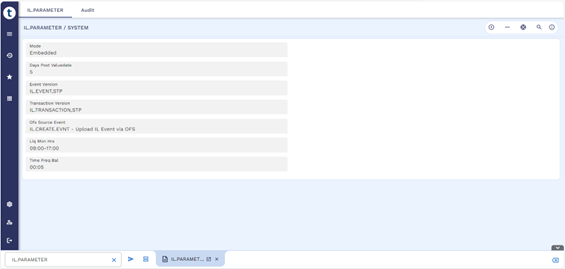
The below table lists the fields in IL.PARAMETER.
| Field | Description |
|---|---|
| Days Post Value Date | Holds the number of days after the value date for an Event and Transaction to be removed from the live IL.EVENT and IL.TRANSACTION tables and to be written to the respective history files. |
| Event Version | Specifies the valid IL.EVENT version. The user can define the IL.EVENT version using which the automatic event records are created. |
| OFS Source Event | The OFS.SOURCE ID present in this field is used to create events automatically from the messages. |
| Transaction Version | Specifies the valid IL.TRANSACTION version. The user can define the IL.TRANSACTION version using which the automatic transaction records are created or updated. |
| Liq Mon Hrs | Based on the value configured here, the first and
last records of IL.TIME.BASED.BAL are created which denotes the start and end
time of the intraday position graph. . It should be configured in such a way that EOD statement is also processed within the time period. Consider a bank that has an SLA with its nostro correspondent to receive the EOD statement at YY:MM Hrs on a daily basis. This field should be configured as XX:MM - ZZ:MM, where XX:MM are the opening liquidity hours and ZZ:MM are the closing liquidity hours which should be greater than receiving time of the EOD statement (YY:MM) Hrs. |
| Time Freq Bal | Specifies the frequency in which IL.TIME.BASED.BAL records should be created within the Liq Mon Hrs configured. |
| Ext Reconciliation | Specifies if the intraday liquidity system is integrated with an external reconciliation engine. Allowed values are Yes and No. |
| Mode |
Specifies the mode of Intraday Liquidity Management. Allowed values are:
The system currently supports only the Embedded mode. |
IL.ENTITY
The IL.ENTITY table stores details of the entities which refers to a distinct unit that has its own legal and operational identity to perform the business functions for liquidity monitoring. It also allows the user to set up parent-child entity relationships, which are used to represent the hierarchical structures of the bank. This helps in monitoring the liquidity at an individual level or the overall liquidity at a lead entity level within the liquidity management solution. The entity configured here is used in downstream static tables like IL.ACCOUNT and IL.BUSINESS.UNIT, along with the dynamic tables like IL.EVENT and IL.TRANSACTION for processing the liquidity based on the entity.
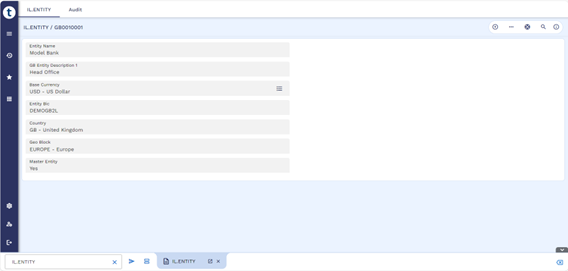
The below table lists the fields in IL.ENTITY.
| Field | Description |
|---|---|
| GB Entity Description | Specifies the number of days after the value date, for the event and transaction to be removed from the live IL.EVENT and IL.TRANSACTION tables and written to the respective history file. |
| Entity Name | Holds the name of the entity. |
| Geo Block | Holds the geographic block of the entity. |
| Base Currency | Holds the local currency of the entity in ISO currency code. |
| Country | Holds the country code of the entity. |
| Entity BIC | Holds the BIC of the entity which is then used in the SWIFT messages. |
| Master Entity |
Indicates if the entity is the master entity where the consolidated liquidity is monitored. Only one master entity is allowed. |
| Parent Entity | Specifies the parent entity to which the liquidity is consolidated. This establishes the parent-child hierarchy of the entities. |
IL.ACCOUNT
The IL.ACCOUNT table contains the nostro accounts for which intraday liquidity is to be monitored. Liquidity management in nostro accounts involves ensuring there are sufficient funds available to meet the bank's transaction needs. This requires careful monitoring of receipts, payments, and obligations to avoid overdrafts and optimize cash flow. Effective liquidity management helps banks maintain appropriate balances and improve their overall capital management framework. The accounts configured here are used in downstream dynamic tables like IL.EVENT and IL.TRANSACTION for processing the liquidity positions and balances based on the accounts.
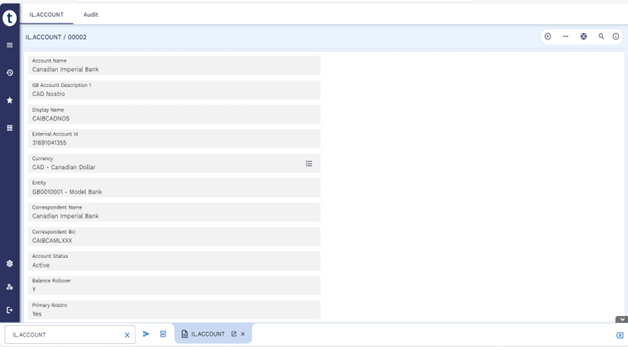
The below table lists the fields in IL.ACCOUNT.
| Field | Description |
|---|---|
| Account Description | Holds the description of the nostro account. |
| Account Name | Specifies the name of the nostro account. |
| Balance Rollover |
Defines whether the closing balance of the account will be rolled over to the next day. Allowed values are:
|
| Correspondent BIC | Holds the BIC of the correspondent or the account servicing institution which is required mainly for account lookup during SWIFT message processing. |
| Correspondent Name | Specifies the name of the correspondent bank or the account servicing institution. |
| Currency | Holds the ISO currency code of the account record involved in transactions. |
| Display Name | Holds the display name of the nostro account. |
| Entity | Indicates the entity in which the account record is created. |
| External Account number |
Indicates the actual account number assigned to the account owner by the account servicing institution.
|
| Primary Nostro | Indicates if the account created or used is considered as the primary nostro. |
IL.SOURCESYS
A source system is an authoritative data source where core data elements are maintained and cash flow transactions originate. It relays all the liquidity-related SWIFT messages to Transact for processing it within the intraday liquidity solution. This solution is integrated with in-house modules such as TPH, DE, and EB.FILE.UPLOAD which acts as the source system and has the ability to integrate with any external source system to process the liquidity-related SWIFT messages. The source system configured here is used in downstream dynamic tables like IL.EVENT and IL.TRANSACTION for processing the liquidity based on the source system.
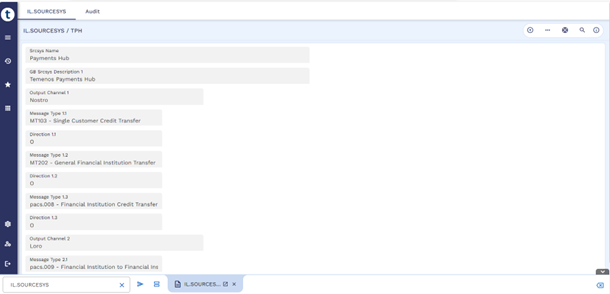
The below table lists the fields in IL.SOURCESYS.
| Field | Description |
|---|---|
| Srcsys Name | Holds the name of the source system. |
| GB Srcsys Description | Holds the description of the source system. |
| Output Channel | Holds the output channel that would be referred while importing the messages from TPH. This is a dropdown field. |
| Direction |
Holds the direction of the message which is intended to be imported from TPH to IL solution. Allowed values are:
|
| Message Type | Holds various MT and MX message types for selection from the IL.MESSAGE. This is a dropdown field. |
Illustrating Model Parameters
This section covers the high-level specifications required for ILM.
| Parameters | Description |
|---|---|
| IL.PARAMETER | The IL.PARAMETER table defines the rules by which the ILM system operates allowing the users to pass through a stored procedure with a single parameter table. This is achieved without modifying the underlying code by having complex business logic within a single routine, making it easier to manage and execute. The configurations done here are used in the downstream dynamic tables like IL.EVENT, IL.TRANSACTION, IL.BALANCE.MVMT, and IL.TIME.BASED.BAL for processing the liquidity positions and balances based on the accounts. |
| IL.ENTITY | The IL.ENTITY table stores details of the entities which refers to a distinct unit that has its own legal and operational identity to perform the business functions for liquidity monitoring. It also allows the user to set up parent-child entity relationships, which are used to represent the hierarchical structures of the bank. This helps in monitoring the liquidity at an individual level or the overall liquidity at a lead entity level within the liquidity management solution. The entity configured here is used in downstream static tables like IL.ACCOUNT and IL.BUSINESS.UNIT, along with the dynamic tables like IL.EVENT and IL.TRANSACTION for processing the liquidity based on the entity. |
| IL.ACCOUNT | The IL.ACCOUNT table contains the nostro accounts for which intraday liquidity is to be monitored. Liquidity management in nostro accounts involves ensuring there are sufficient funds available to meet the bank's transaction needs. This requires careful monitoring of receipts, payments, and obligations to avoid overdrafts and optimize cash flow. Effective liquidity management helps banks maintain appropriate balances and improve their overall capital management framework. The accounts configured here are used in downstream dynamic tables like IL.EVENT and IL.TRANSACTION for processing the liquidity positions and balances based on the accounts. |
| IL.SOURCESYS | A source system is an authoritative data source where core data elements are maintained and cash flow transactions originate. It relays all the liquidity-related SWIFT messages to Transact for processing it within the intraday liquidity solution. This solution is integrated with in-house modules such as TPH, DE, and EB.FILE.UPLOAD which acts as the source system and has the ability to integrate with any external source system to process the liquidity-related SWIFT messages. The source system configured here is used in downstream dynamic tables like IL.EVENT and IL.TRANSACTION for processing the liquidity based on the source system. |
Illustrating Model Products
The below table lists the products of the Intra Day Liquidity Management module.
| Product Name | Product Attributes |
|---|---|
| Intraday Liquidity Position | The Intraday Positions screen provides the liquidity officer with the real -time intraday positions of a nostro account within the liquidity monitoring hours in a line graph format. |
| Cash Ladders | The Cash Ladder screen acts as an effective tool for managing liquidity, that displays the cash flows and obligations spread over time. The laddering helps manage operational costs by timing the incoming and outgoing funds. |
| Projections | The Projections screen provides the liquidity officer with the option to project the positions and transaction details from the current day within the liquidity monitoring hours. T to T+5 days projections is the default value for first-time selection. |
| Liquidity Events | A liquidity event is a message or data feed from an external system such as SWIFT, CBS, TMS, Payment Hub, and so on. Such liquidity events happen on a real-time basis. Hence, the ILM solution subscribes to such events and processes them in near real-time. An event can be created manually or automatically through STP. |
| Liquidity Transaction | A liquidity transaction
contains the details generated through different events, such as receipts,
payments, statements, and SWIFT messages from a source system for various
entities in a liquidity management solution. A
Transaction can be created manually or automatically through STP.
It can also be automatically matched or manually matched by the user. Event to Transaction is a many-to-one relation. |
| Liquidity Balance Movements | Liquidity Balance Movements represent the Opening Balances, Intraday Balances, and Closing Balances on the account. Wherever possible, the balance movements are generated automatically from the bank's source systems such as the Core Banking System, Ledger Systems, Payment Hubs, and Treasury Management Systems. |
In this topic